
How to apply for an examination
On this page
Registration information
Registrations will NOT be accepted outside of the advertised registration period.
Payment of the full examination fee is required at time of registration
The Specialty Training Boards will assess candidate eligibility and those deemed ineligible to sit the examination will be notified in writing approximately 3 weeks after registration. This occurs on each occasion a candidate applies for the Fellowship examination
When to apply
How to apply
To register click on the 'Apply Now' button which will appear on the blue ribbon at the top of the main Fellowship Examination page.
Candidates with a Written Exemption should select the Clinical Only Pass in the Registration Form. Candidates who register to this Pass without an exemption will be withdrawn.
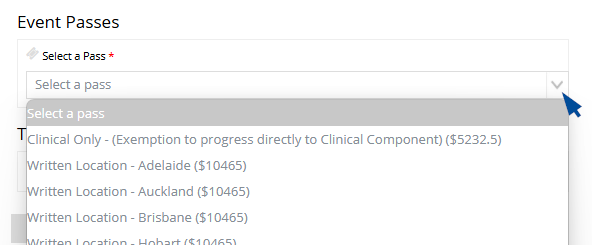
See the Training Services QRG (PDF 568.52KB) for full instructions.
Registration Platform:
- Sign in to eHub
- New to eHub, create a new account.
- Forgot your password? Use the “reset password” feature instead of creating a new account.
- Navigate to Training & Services/Examinations Page
- Select Exam Event
- Complete the registration form
- Select pass
- Agree to the Terms and Conditions
- Make payment via card or PayPal
A tax invoice will be sent to you by email once payment has been processed and your registration confirmed
Tips for registration:
- Google Chrome or Microsoft Edge are the preferred web browsers
- Processing may take longer during high registration volumes – please be patient
- If you do not pay for the event in the shopping cart within 15 minutes, you will have to go through the registration process again.
- Your spot in the event is not reserved just by adding the event to the shopping cart.
- View Training & Services Platform (eHub) Quick Reference Guide or watch How to Video